
O2 Direct Top Up – Credit Sent to Your Number
Price range: £5.99 through £35.99
Top up an O2 pay as you go number online. We add the credit straight to the number, so there is no voucher code to enter. Choose £5 to £35, type the mobile number and pay.
No refunds once the order is completed. Please check the mobile number and the network before you pay.
Check your O2 bundle first: an O2 SIM can have a £10, £15, £20 or £30 bundle pre-selected, and it switches on by itself when you top up enough credit. Check which bundle is pre-selected before you order.
O2 direct top up: we add the credit for you
With a direct top-up you don’t get a code. You tell us the O2 pay as you go number, and we put the credit on it. It is the easy way to top up your own phone, or the phone of someone in your family, from anywhere in the world.
Has your O2 SIM got a bundle selected?
Before you top up, find out whether your SIM has a £5, £10, £15 or £20 pack selected.
- To renew your bundle: choose the same amount as your bundle. For example, if you are on the £15 bundle, buy a £15 direct top-up and it renews for another 30 days once the credit is added.
- To add credit only: stop the Big Bundle first by changing the SIM’s tariff. Call 2202 (free) from the O2 SIM: put the SIM in a phone, dial 2202, listen to the tariff and bundle options, and switch to a pay as you go tariff without a bundle if it is offered. You can also call O2 customer services from the SIM and ask them to cancel the pre-selected bundle. When it is stopped, buy the credit you want.
Example: your SIM had the £15 pack last month. Buy a £15 direct top-up and the £15 pack starts again for another 30 days as soon as the credit lands. Buy a £10 direct top-up instead and you get £10 of credit only, with no pack.
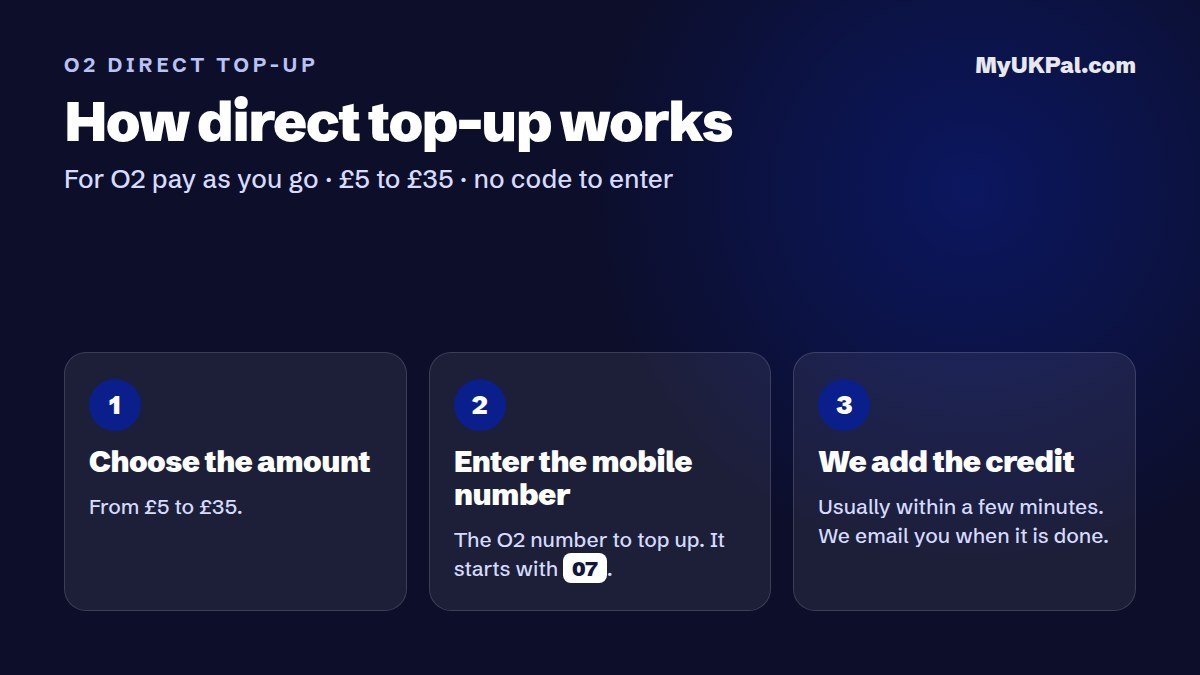
How it works
- Choose the amount: £5, £10, £15, £20, £25, £30, £35.
- Type the O2 mobile number you want to top up. It has 11 digits and starts with 07.
- Pay by PayPal, card or bank transfer.
- We add the credit to that number, usually within a few minutes of your payment, and email you when it is done.
Good to know
| Works on | O2 pay as you go numbers in the UK |
|---|---|
| Does not work on | Pay monthly (contract) numbers and numbers on other networks |
| Amounts | £5, £10, £15, £20, £25, £30, £35 |
| What you get | Credit on the number you gave us. Nothing is posted and there is no code to enter. |
| How you know it is done | We send you an email |
Before you buy
- Check the number twice. Credit sent to a wrong number can’t be moved to another number.
- O2 only. If the number is on another network, choose that network on our direct top-up page.
- Refunds: once the top-up is completed it can’t be refunded. If something looks wrong, contact us on live chat with your order number and we’ll help.
Direct top-up or voucher code?
Direct top-up is best when you just want the credit added. If you would rather have a code you can keep or send to someone, buy an O2 top-up voucher and we email the code to you.
Questions
How fast is the O2 credit added?
Usually within a few minutes of your payment. We email you when it is done.
Can I top up someone else’s phone?
Yes. Enter their O2 pay as you go number instead of yours. You can order from abroad too.
Does it work on a pay monthly phone?
No. Direct top-up is for pay as you go numbers only.
I typed the wrong number. What now?
Contact us on live chat straight away with your order number. If the credit has not been added yet we can correct it. Once it has been added it can’t be moved.
Need a new SIM? Order an O2 SIM card by post, or see our preloaded UK SIM cards. Prefer an eSIM? See our O2 UK eSIM. All codes by email are on our top-up vouchers page.
Additional information
| Amount | £5, £10, £15, £20, £25, £30, £35 |
|---|
Related products
-

Lycamobile Direct Top Up – Credit Sent to Your Number
Price range: £5.99 through £35.99Select options This product has multiple variants. The options may be chosen on the product page -
Vodafone Direct Top Up – Credit Sent to Your Number
Price range: £5.99 through £40.99Select options This product has multiple variants. The options may be chosen on the product page -
EE Direct Top Up – Credit Sent to Your Number
Price range: £5.99 through £35.99Select options This product has multiple variants. The options may be chosen on the product page -
Virgin Mobile Direct Top Up – Credit Sent to Your Number
Price range: £5.99 through £35.99Select options This product has multiple variants. The options may be chosen on the product page